
Download Vipani – Kerala, super review, food delivery, grocery delivery, home services, plumbing, beautician at home, document delivery
Overview
Vipani is a free Android application designed to simplify daily life for residents of Kerala. Developed by Vipani, the app falls under the Lifestyle category with a focus on Food & Drink services. It aims to serve as a one-stop solution for essential needs, offering services such as food and grocery delivery, plumbing assistance, document delivery, and home-based beautician appointments. The app targets busy professionals, families, and individuals seeking time-saving, convenient alternatives to traditional service models. Its primary function is to connect users with vetted local partners who provide fast and reliable delivery or on-site services. Vipani’s operational reach includes multiple localities across Kerala, such as Kannur City, Taliparamba, Payangadi, Payyanur, Cherukkunu, and Cheruvathur. The developer did not provide additional details about the company’s background or broader expansion plans. However, the app’s design emphasizes user accessibility and seamless integration into daily routines. Whether ordering dinner, scheduling a plumber, or arranging a beauty service at home, Vipani streamlines the process through a centralized platform. The app is particularly valuable in urban and semi-urban areas where convenience and speed are prioritized. It reflects a growing trend in localized digital services tailored to regional lifestyles.Key Features & Capabilities
- Food and Grocery Delivery – Users can order meals and essential groceries from local stores, with options for real-time tracking and timely delivery.
- Home Service Booking – The app enables users to schedule on-demand services like plumbing repairs, beautician visits, and document delivery directly from their mobile devices.
- Localized Service Network – Vipani partners with trained professionals across multiple Kerala localities, ensuring service availability in targeted areas.
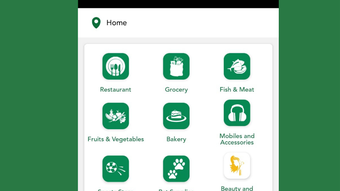
- Intuitive User Interface – The app features a clean layout with straightforward navigation, allowing users to browse services, place orders, and track progress with minimal effort.
- Instant Sign-Up and Access – New users can register quickly and begin using the app immediately after downloading from the Google Play Store.
User Interface, Workflow & Performance
The user interface of Vipani is structured around simplicity and accessibility. The main screen presents categorized service options, allowing users to quickly select their desired function—be it food delivery, home services, or grocery shopping. Navigation is consistent across screens, with clearly labeled icons and minimal clutter. The workflow follows a logical sequence: browse, select, confirm, and track. This streamlined process reduces user friction and supports efficient task completion. The app’s performance is expected to be stable given its focus on core functionality and targeted regional deployment. However, exact performance details such as CPU usage, RAM consumption, or load times were not specified. The developer did not provide information about background processes or app responsiveness under heavy usage. General software behavior suggests that the app operates smoothly within standard Android environments, especially on devices with moderate specifications. Stability is likely maintained through regular updates, though no details were shared on update frequency or crash reports. Users can expect a functional experience based on the app’s design and intended use, but real-world performance may vary depending on device capabilities and network conditions.Compatibility & System Requirements
Vipani is designed for Android operating systems and is currently available in version 1.0. The installation package size is 25MB, indicating a lightweight footprint suitable for most Android devices. The app is accessible through the Google Play Store, ensuring compatibility with devices that support the latest Android versions. However, the developer did not specify minimum Android version requirements or hardware specifications such as RAM, processor, or storage. Exact system requirements were not listed, so users are advised to ensure their device meets standard Android compatibility standards. The app’s focus on local services in Kerala suggests it may prioritize performance on mid-range devices common in the region. Platform compatibility information is limited to Android, with no indication of support for iOS, Windows, or Mac. Users should verify device compatibility through the Google Play Store before downloading. The app’s lightweight size and targeted deployment suggest broad accessibility, but official requirements remain unspecified.Pros and Cons
- Free to download and use with no hidden costs
- Comprehensive range of daily services in a single app
- Designed for ease of use with intuitive navigation
- Extensive coverage in multiple Kerala localities
- Fast delivery and service scheduling options
- No official information on system requirements or device compatibility
- Service availability limited to specific regions in Kerala
- App size and performance details not fully disclosed
- Only available on Android, no support for other platforms
- Limited information on update frequency or long-term maintenance







